
The Sharp BP-71C65 is one of the latest generation of Sharp A3 colour multifunctional printers, designed for workplaces where printing and scanning are still an important part of the working day.
It is fast, capable and packed with useful features, but what makes the BP-71C65 interesting is that many of those features are designed to make everyday office work easier rather than simply adding another line to a specification sheet.
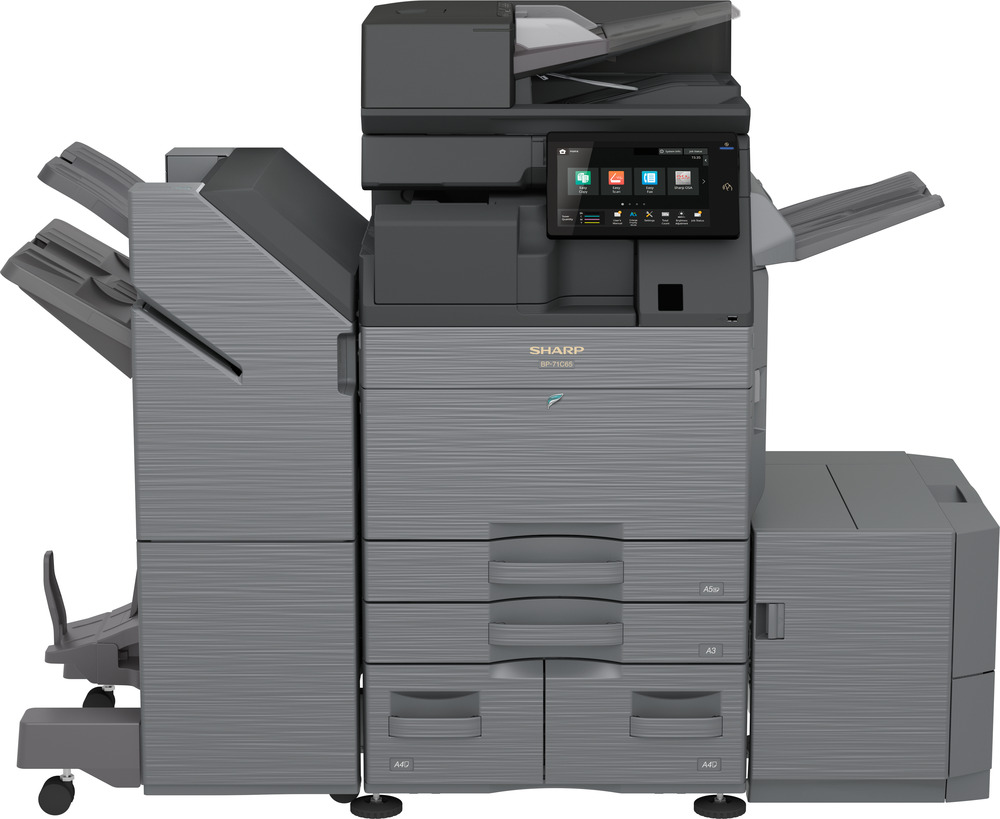
Fast enough for a genuinely busy office
With print and copy speeds of up to 65 pages per minute in both colour and black and white, the BP-71C65 is designed for environments where the printer is shared by a busy team rather than sitting quietly in the corner.
Scanning is particularly impressive. Its 300-sheet document feeder can scan both sides of a document in a single pass at up to 300 images per minute. For businesses regularly scanning contracts, invoices, customer records or large batches of paperwork, that can make a noticeable difference to the working day.
You can also replenish paper and toner without stopping an active print or copy job, which is exactly the sort of small feature that becomes important when several departments depend on the same machine.
Designed to be easy to use
A powerful office photocopier does not need to feel complicated.
The BP-71C65 uses a 10.1-inch tilting colour touchscreen with smartphone-style controls, making everyday functions such as copying, scanning and selecting workflows straightforward for regular users. A motion sensor can even wake the machine as someone approaches it.
For organisations using Microsoft 365, the built-in Microsoft Teams connector is useful too. Documents can be scanned to or printed from Teams channels directly at the device. Microsoft Entra ID integration can also be used to support user authentication.
Mobile users have plenty of options as well, including Wi-Fi, AirPrint, Bluetooth, NFC and QR-code connectivity.
Security that happens in the background
Office printers now handle a surprising amount of sensitive information, so security has become much more important than it was a few years ago.
Sharp has built several layers of protection into the BP-71C65. The machine can check its own firmware during startup and automatically recover its BIOS if a problem is detected. It also includes technologies such as a Trusted Platform Module and firmware protection, with optional Bitdefender anti-malware available for organisations that want an additional layer of security.
There is also a standard Print Release function. Rather than sensitive documents sitting unattended in an output tray, users can release their print job when they are actually at an appropriate Sharp MFP on the network.
For most users, none of this needs to make the machine harder to operate. It is simply additional protection working behind the scenes.
More than just printing and copying
The BP-71C65 can be configured with a wide range of finishing options, including stapling, punching, folding and saddle stitching. That makes it particularly useful for businesses producing reports, presentations, booklets, proposals or other customer-facing documents in-house.
It can handle paper up to SRA3 and, depending on configuration, its paper capacity can be expanded substantially for higher-volume environments.
Sharp has also included its My Favourite Colour Tone feature, allowing the colour output to be adjusted using preset profiles. This can be particularly useful when replacing an older machine and trying to keep familiar colour output across existing documents.
A more sustainable design
The environmental improvements are also practical rather than purely cosmetic.
Sharp says up to 50{cfd08551d2e3a628db8ddf37d12ca4abdda7317cbf52a9e5ecb21cb8b49506ce} recycled plastic is used in the manufacture of the base unit, while cardboard packaging is used to reduce plastic waste. The machine has also been designed around lower energy consumption and longer-life components, with the aim of reducing both energy use and unnecessary service visits.
Its power-saving mode is designed to keep consumption low while still allowing the machine to become ready quickly when someone needs it.
Who is the Sharp BP-71C65 best suited to?
This is not really a machine for a small office that prints a handful of documents each day.
The BP-71C65 makes more sense for a busy medium or large workgroup, or an organisation where one central device is supporting several departments.
It is particularly well suited to workplaces that:
- produce a high volume of colour and black-and-white documents;
- scan significant quantities of paperwork;
- have several people sharing the same device throughout the day;
- need strong document and network security;
- use Microsoft 365 and Teams as part of their normal workflow;
- produce professional reports, booklets or presentations internally;
- want a machine that can grow with their requirements through additional paper and finishing options.
That could include busy commercial offices, professional services businesses, education, healthcare, larger administrative teams and organisations replacing several smaller devices with a more capable central MFP.
Is the BP-71C65 right for every business?
Probably not — and that is important.
At 65 pages per minute, the BP-71C65 sits at the high-performance end of Sharp’s current BP-71 A3 colour range. Many businesses will get everything they need from one of the lower-speed models in the same family.
The right machine should be based on how many people will use it, how much you actually print and scan, the type of documents you produce and the way the device needs to fit into your existing IT environment.
For a genuinely busy office, though, the Sharp BP-71C65 combines speed, very fast scanning, straightforward operation, modern security and flexible finishing in a very capable package.
If you’re considering a new office photocopier or multifunction printer, Phoenix South West can help you compare the available options and decide whether the BP-71C65 — or another model better matched to your workload — is the right fit.