
For years, the default choice for many offices has been an A3 floor-standing photocopier. They are familiar, flexible and can handle almost anything you throw at them.
But there is a simple question worth asking before replacing your current machine:
Do you actually need A3?
For plenty of businesses, the answer is increasingly no.
If most of your everyday work consists of emails, invoices, reports, letters, forms and other A4 documents, a modern A4 multifunction printer can provide much of the functionality you would expect from a larger office photocopier while taking up considerably less space.
The Sharp BP-C131WD is a good example. It is one of Sharp’s latest A4 colour multifunction printers, combining printing, copying, scanning and faxing in a machine with a footprint of just 410 x 410mm. Sharp designed it specifically for modern workplaces where space matters but businesses do not want to compromise on everyday functionality.
Small machine, proper office performance
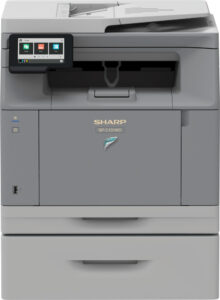
The first thing that stands out about the BP-C131WD is its size.
It can sit on a desk, under a counter or in a cabinet rather than demanding the floor space normally associated with an office photocopier. That makes it particularly useful where every square metre of office space counts.
Being compact does not mean being slow.
The BP-C131WD prints at up to 31 pages per minute in both colour and black and white, which is more than enough for many everyday office environments. Its standard paper capacity is 300 sheets and can be expanded to 800 sheets if required.
For a smaller office or workgroup, that gives you a capable business machine without installing something considerably larger than your actual requirements justify.
Scanning hasn’t been forgotten
Printing is only part of the job for most modern office machines.
The BP-C131WD has a 50-sheet dual-sided document feeder, allowing it to scan both sides of a document in one pass at up to 60 images per minute.
That makes everyday jobs such as scanning invoices, signed documents, contracts, customer paperwork and administration files much less of a chore.
Documents can be scanned to destinations including email, network folders, USB and desktop locations.
So although this is a compact A4 device, it can still sit at the centre of a normal office document workflow rather than simply acting as somebody’s personal printer.
Easy to use
Nobody wants to train an entire office just to use the printer.
Sharp has fitted the BP-C131WD with a 4-inch tilting colour touchscreen, designed to give users a familiar and straightforward interface. The screen can be adjusted to suit the person using the machine, and the general approach is consistent with other Sharp office devices.
It also has built-in wireless connectivity and support for printing and scanning from mobile devices.
These are not particularly glamorous features, but they are the sort of things that matter in daily use: walk up to the machine, find what you need and get the job done without fighting with it.
Security without making life complicated
Printers and photocopiers handle more sensitive information than people sometimes realise.
Invoices, payroll documents, customer records, contracts and internal reports can all pass through the same machine.
The BP-C131WD includes modern security features such as data encryption and erasure, user authentication, TLS 1.3 support and remote firmware updates.
The important point for most businesses is not the technical terminology. It is that this is a modern business device designed with document and network security in mind rather than a basic desktop printer that happens to have a scanner attached.
A more sensible use of office space
This is where the BP-C131WD becomes particularly interesting.
A traditional A3 multifunction printer makes complete sense if you regularly:
- print or copy A3 documents;
- produce large plans, spreadsheets or diagrams;
- require larger paper sizes;
- need substantial paper capacity;
- require advanced finishing such as stapling, folding or booklet production.
But many offices simply don’t do those things.
If almost everything leaving your printer is A4, paying for the footprint and capabilities of a larger A3 machine may not always be necessary.
The BP-C131WD handles paper up to A4, so there is a genuine trade-off. It is not intended to replace an A3 device in an organisation that actually uses A3. It is about matching the equipment to the work you really do.
Designed with sustainability in mind
Sharp has also put considerable emphasis on the environmental design of this generation.
The BP-C131WD is manufactured using up to 50{cfd08551d2e3a628db8ddf37d12ca4abdda7317cbf52a9e5ecb21cb8b49506ce} recycled plastic, and Sharp has replaced polystyrene packaging with fully recyclable corrugated cardboard. Sharp also says the compact design uses fewer parts and incorporates technology intended to reduce power consumption.
The design has received recognition too, including a 2024 Good Design Award for its compact design and sustainability approach.
For a business replacing older equipment, choosing a smaller machine that is properly matched to the workload can also make more sense than automatically replacing a large device with another large device.
Who is the Sharp BP-C131WD best suited to?
The BP-C131WD makes most sense where people need the functionality of a proper office multifunction printer but A3 output isn’t part of the normal working day.
It could be particularly well suited to:
- small and medium-sized offices;
- individual departments within a larger organisation;
- reception and administration areas;
- professional services businesses;
- satellite or regional offices;
- education and healthcare administration;
- businesses where office space is limited;
- home offices with more demanding business-print requirements;
- organisations that need a capable second device alongside a larger central MFP.
It could also be an interesting option when replacing several basic desktop printers. Instead of having a collection of small printers dotted around an office, a more capable shared A4 device can give a workgroup printing, copying and fast scanning from one place.
When should you still choose A3?
There are plenty of occasions when an A3 machine remains the right answer.
If your business regularly produces A3 documents, needs high paper capacities, has particularly heavy print volumes or relies on finishing options such as stapling and booklet making, a larger A3 multifunction device will normally be the more appropriate choice.
The BP-C131WD is not trying to pretend those requirements don’t exist.
Its strength is that many offices don’t have those requirements in the first place.
That is why the question should not simply be, “Which A3 photocopier should we buy?”
It should be:
What do we actually need the machine to do?
A compact alternative worth considering
At 31 pages per minute, with colour printing, copying, duplex scanning, faxing, wireless connectivity and modern security features, the Sharp BP-C131WD packs a substantial amount of office functionality into a very small footprint.
For businesses that mainly work with A4 documents, it could be a much more natural fit than automatically installing another large floor-standing photocopier.
And that is really the point.
Don’t buy A3 simply because you’ve always had A3.
Look at what your team actually prints, how much space you have, how many people will use the machine and what your normal document workflow looks like.
If you’re considering replacing an office printer or photocopier, Phoenix South West can help you look at your actual requirements and decide whether a compact A4 device such as the Sharp BP-C131WD, or a larger A3 system, is the better fit.